How Kubernetes detects and restarts crashing pods automatically
Understand Kubernetes self-healing by exploring how the Kubelet, PLEG, probes, and CrashLoopBackOff work together to restart failing containers. Kubernetes is often described as a self-healing system because it can autom...
Understand Kubernetes self-healing by exploring how the Kubelet, PLEG, probes, and CrashLoopBackOff work together to restart failing containers.

Kubernetes is often described as a self-healing system because it can automatically recover from application failures. When a container crashes, Kubernetes detects the failure and brings the workload back to a running state without manual intervention. But how does Kubernetes restart crashing pods?
A common assumption is that Kubernetes restarts Pods when something goes wrong. In reality, Pods are rarely restarted. Failure recovery happens at a much lower level and is driven by continuous monitoring of container processes on each node.
Containers can fail in multiple ways: a process may exit with a non-zero exit code, the operating system may terminate it due to memory limits, or the application may become unresponsive. Kubernetes observes these failures and decides whether and when a restart should occur, applying safeguards to prevent repeated crashes from overwhelming the system.
This blog post walks through how Kubernetes detects container failures and how restart decisions are made, starting at the node level and moving up to cluster-wide recovery.
1. How Kubernetes Detects Container Failures at the Node Level
1.1 Why Failure Detection Happens on the Node, Not the Control Plane
To understand detection, we must look at the Node Level. The Kubernetes Control Plane (API Server) is often too far removed to handle immediate process failures. The heavy lifting is performed locally by the Kubelet.
The Kubelet continuously reconciles two states:
- Desired State: What should be running on the node, as defined by Pod specifications received from the API Server.
- Actual State: What is currently running, as reported by the container runtime.
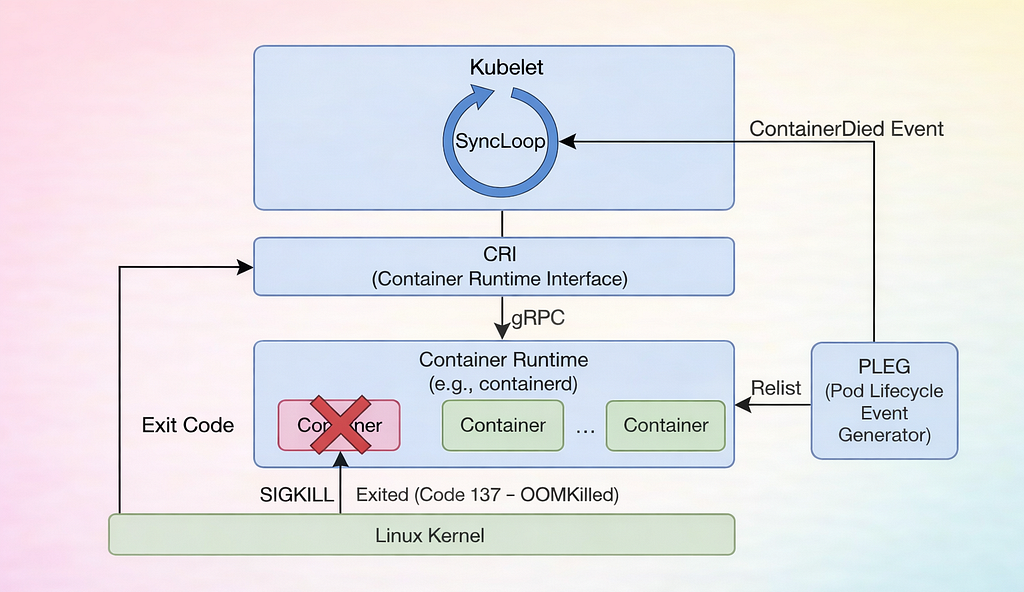
This reconciliation is performed through a continuous control loop known as the SyncLoop.
1.2 Kubelet SyncLoop
The SyncLoopis the core control loop of the Kubelet. Its job is to ensure that the actual state of containers always matches the desired state.
For example:
- Desired State: “Run Nginx version 1.2.” (From API Server)
- Actual State: “Nginx is running.” (From Runtime)
When a container crashes or exits, the actual state no longer matches the desired state. Detecting this change quickly is critical for Kubernetes to take corrective action.
1.3 Why Polling Did Not Scale
In early Kubernetes versions, the Kubelet relied heavily on polling the container runtime — repeatedly asking whether containers were still running. As node density increased to hundreds of Pods per node, this approach caused unnecessary CPU overhead and delayed failure detection.
This limitation led to the introduction of an event-driven mechanism.
1.4 Pod Lifecycle Event Generator (PLEG)
PLEG is an internal Kubelet component responsible for detecting container state transitions efficiently.
- Relisting: Periodically retrieves the full list of containers from the runtime.
- Comparison: Compares the current container state with the previous snapshot.
- Event Generation: When a change is detected — such as a container transitioning from Running to Exited — PLEG generates a lifecycle event (for example, ContainerDied).
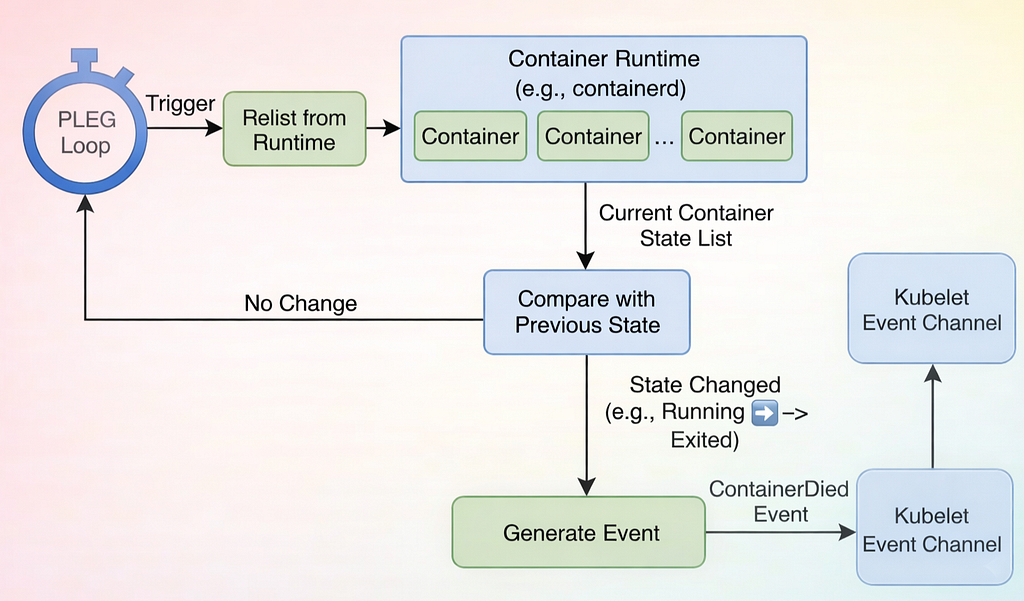
This event immediately notifies the Kubelet, allowing it to react without waiting for the next reconciliation cycle.
2. How Kubernetes Detects Container Failures
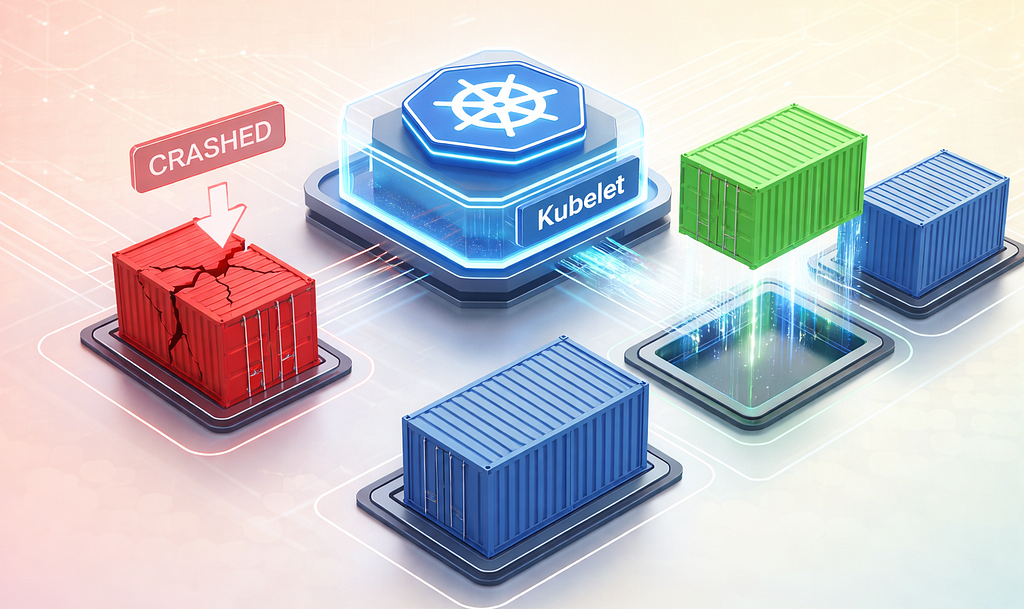
Kubernetes determines that a container has failed by observing specific signals from the Linux kernel, the container runtime, and the Kubelet’s health probes. Understanding these signals is essential for diagnosingfailures and designing resilient workloads.
2.1 Process Exit (Crash)
Every container runs a main process (PID 1). When this process stops, it sends an exit code to the operating system:
- Exit Code 0: The process finished successfully. Kubernetes considers the container Completed.
- Exit Code 1–255: The process crashed or threw an error. Kubernetes marks the container as Error via the CRI.
Detecting non-zero exit codes allows the Kubelet to differentiate between successful completions and failures, forming the basis for restart decisions.
2.2 OOMKilled Signal (Exit Code 137)
One of the most common failure causes is being killed due to out-of-memory (OOM):
- Scenario: Your application tries to allocate 512MB of RAM, but the Pod’s resources.limits.memory is set to 256MB.
- Kernel Reaction: The Linux kernel cgroups mechanism enforces the memory limit and invokes the OOM Killer, sending a SIGKILL to the process.
- Result: The container dies instantly with Exit Code 137 (128 + 9 for SIGKILL).
What it looks like in kubectl describe pod:
State:          Terminated
  Reason:       OOMKilled
  Exit Code:    137
  Started:      Wed, 26 Jan 2025 12:00:00 GMT
  Finished:     Wed, 26 Jan 2025 12:05:00 GMT
If you see Exit Code 137, simply restarting the container will not solve the problem. You must either fix the memory issue in your code or increase resources.limits.memory in your Pod specification.
2.3 Liveness Probe Failures
Sometimes, the main process is still running, but the application is frozen, deadlocked, or stuck. The kernel alone cannot detect this scenario. Kubernetes relies on liveness probes to actively check the health of the application.
Example configuration:
livenessProbe:
  httpGet:
    path: /healthz
    port: 8080
  initialDelaySeconds: 15
  periodSeconds: 20
  failureThreshold: 3
If the endpoint returns an error (e.g., HTTP 500) or times out consecutively according to failureThreshold, the Kubelet marks the container as unhealthy and forcefully kills it to trigger a restart.
2.4 Lead-In to Restart Logic
Once a failure is confirmed, the Kubelet consults the Pod’s restartPolicy to determine whether and how to restart the container.
- Always (default): Restart container regardless of exit reason.
- OnFailure: Restart container only if it exited with a non-zero code.
- Never: Do not restart; useful for debugging or one-off tasks.
spec:
  restartPolicy: Always
3. How Kubernetes Restarts Containers:
Once a container failure is detected, Kubernetes must decide whether and when to restart it. This behavior is controlled by the Pod’s restartPolicy and further refined by the CrashLoopBackOff mechanism to prevent repeated rapid restarts.
3.1 Pod Restart Policies
The Kubelet consults the Pod specification’s restartPolicy to determine how to respond to a container failure. There are three main policies:
- Always (default): The container is restarted regardless of exit reason. This is ideal for long-running services such as web servers or APIs.
spec:
  restartPolicy: Always
- OnFailure: The container is restarted only if it exits with a non-zero exit code. If it completes successfully (Exit Code 0), it is not restarted. This is suitable for batch jobs or data-processing tasks.
spec:
  restartPolicy: OnFailure
- Never: The container is never restarted, even if it crashes. This is useful for debugging or one-off static Pods.
spec:
  restartPolicy: Never
3.2 CrashLoopBackOff: Preventing Rapid Restart Storms
Imagine your application crashes immediately after starting. If Kubernetes restarted it instantly every time, the container could restart hundreds of times per second, consuming all CPU on the node.
To prevent this, Kubernetes uses the CrashLoopBackOff mechanism:
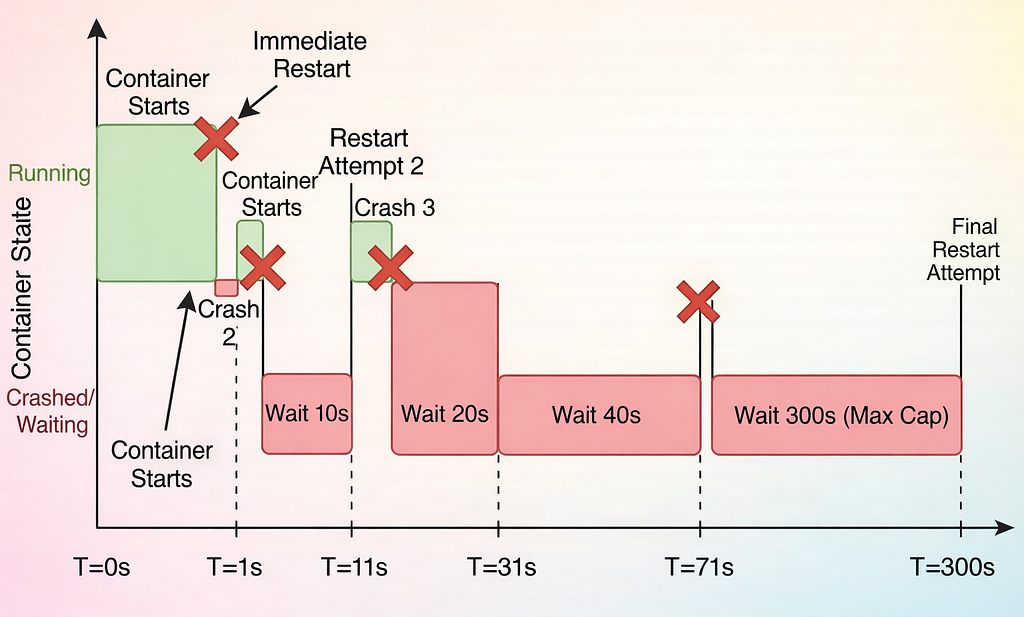
- When a container fails repeatedly, the Kubelet delays the next restart using exponential backoff.
- Each subsequent crash doubles the wait time:
- Crash 1: Immediate Restart.
- Crash 2: Wait 10s.
- Crash 3: Wait 20s.
- Crash 4: Wait 40s.
- …
- Max Delay: 300s.
When you see CrashLoopBackOff in kubectl get pods, Kubernetes is currently waiting before attempting the next restart.
3.3 Resetting the Backoff Timer
The backoff timer doesn’t last forever. If a container runs successfully for a stable period, Kubernetes resets the backoff counter. This period is often controlled by minReadySeconds or the default health window.
Effect:
- Prevents penalizing containers that had transient issues
- Ensures normal operation resumes quickly after recovery
4. How Kubernetes Handles Container Recovery and Debugging
Even with restart policies and CrashLoopBackOff, some containers may fail due to slow startups, deadlocks, or complex dependency issues. Kubernetes provides additional mechanisms to handle these scenarios safely and help engineers diagnose problems efficiently.
4.1 Startup Probes: Handling Slow-Starting Applications
Some applications, such as Java services or AI models loading large datasets, may take minutes to start. Standard liveness probes could kill these containers before they finish booting.
Solution: Use a startupProbe:
startupProbe:
  httpGet:
    path: /healthz
    port: 8080
  failureThreshold: 30
  periodSeconds: 10
How it works:
- Kubernetes checks the probe every 10 seconds, up to 30 times (300 seconds total).
- Liveness probes are disabled until the startup probe succeeds.
- This ensures that slow-starting applications are not killed prematurely.
4.2 Sidecar Containers: Isolating Critical Functions
Kubernetes allows running sidecar containers alongside your main application:
- Examples: logging agents, monitoring exporters, or proxy services.
- If a sidecar fails, it does not necessarily affect the main application, depending on your Pod design.
- Properly configured sidecars can increase observability and recovery safety.
4.3 Debugging Crash Loops
Sometimes, a container fails repeatedly and logs alone are insufficient. Kubernetes provides tools for live debugging:
- Check previous logs:
kubectl logs <pod-name> --previous
Shows logs from the last failed container instance.
- Inspect Pod events:
kubectl describe pod <pod-name>
Reveals the reason for Kubelet restarts (e.g., OOMKilled, Liveness Probe Failed).
- Attach ephemeral containers:
kubectl debug -it <pod-name> --image=busybox --target=<container-name>
Provides a shell inside a running container without restarting it, allowing inspection of the filesystem or environment.
5. How Kubernetes Recovers When a Node Fails
While container-level recovery handles individual container crashes, Kubernetes also ensures that workloads recover when an entire node fails. This is essential for maintaining high availability in a cluster.
5.1 Detecting Node Failures
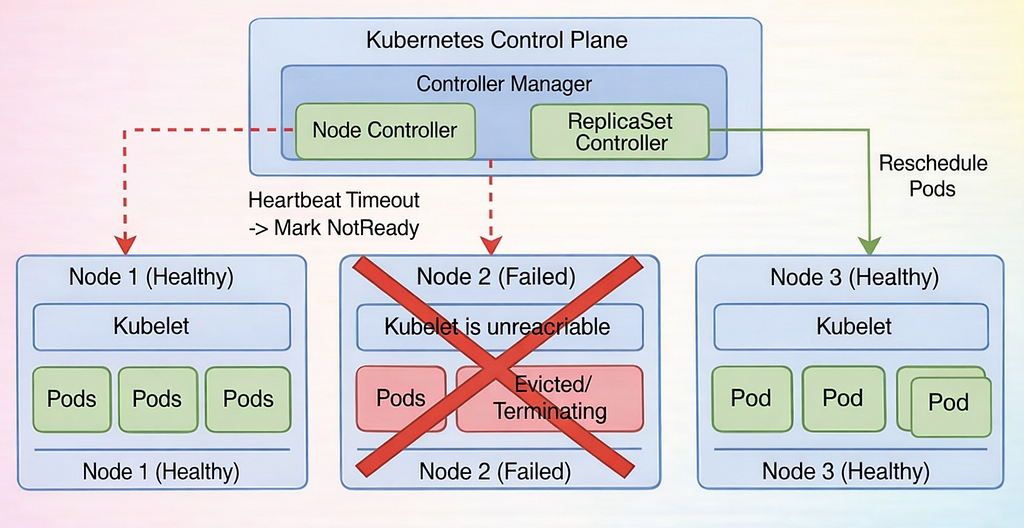
Each node in a Kubernetes cluster continuously reports its status to the API Server. The control plane monitors these heartbeats:
- Nodes send status updates every ~10 seconds
- If the API Server receives no updates for a configured timeout (default: 5 minutes, --pod-eviction-timeout), the node is considered NotReady
At this point, the Node Controller steps in.
5.2 Eviction and Pod Rescheduling
Once a node is marked NotReady:
- The Node Controller applies a NoExecute taint to the node.
- Pods running on the failed node are evicted according to their tolerations.
- ReplicaSets, Deployments, and StatefulSets detect that the number of running replicas has dropped below the desired count.
- New pods are scheduled on healthy nodes to restore the intended workload.
This process ensures that your services remain available, even if one or more nodes fail.
6. How Kubernetes Keeps Your Applications Running
Kubernetes’ self-healing capabilities go far beyond simply restarting containers. It is a sophisticated system designed to keep applications running reliably, even when things go wrong at the container, node, or cluster level.
Here’s what makes Kubernetes self-healing so powerful:
- Instant Failure Detection: The Kubelet, together with PLEG, monitors every container and immediately detects crashes, OOMKilled signals, or frozen applications.
- Smart Restart Decisions: Restart policies and CrashLoopBackOff ensure that containers are restarted safely without overwhelming resources, giving your workloads time to stabilize.
- Advanced Recovery Tools: With startup probes, sidecars, and ephemeral containers, Kubernetes handles slow-starting apps and complex failures gracefully.
- Cluster-Level Resilience: Even if an entire node fails, controllers like ReplicaSets and the Node Controller reschedule pods on healthy nodes, keeping the cluster in its desired state.
By understanding these mechanisms, engineers can design resilient applications, troubleshoot failures faster, and avoid downtime.
In short, Kubernetes doesn’t just restart what breaks — it orchestrates a full recovery strategy, automatically maintaining reliability across containers and nodes.
How Kubernetes detects and restarts crashing pods automatically was originally published in DevOps.dev on Medium, where people are continuing the conversation by highlighting and responding to this story.